
How to Move Files From One Google Drive Account to Another
We have new email address under Durioo, so now how to move files from previous account (x@digitaldurian.tv or x.digitaldurian@gmail.com) to google drive under my new email address (x@durioo.com)?
If you want to move files from one account to another without downloading and re-uploading them, here's what you have to do. We have two ways on to do this
B. Create one folder as a master sharing folder
Let's see the steps for each one:
A. Per Folder Sharing the Document With Your Other Google Account
If you just want to transfer one document over, you can do a one-off share to your other account. It doesn't require a lot of setup, and it's really easy to do.
- Open your old / previous Google Drive account. For eg: xxx@digitaldurian.tv / xxx.digitaldurian@gmail.com
- Go the files or folders you want to move to your new Durioo Drive account.
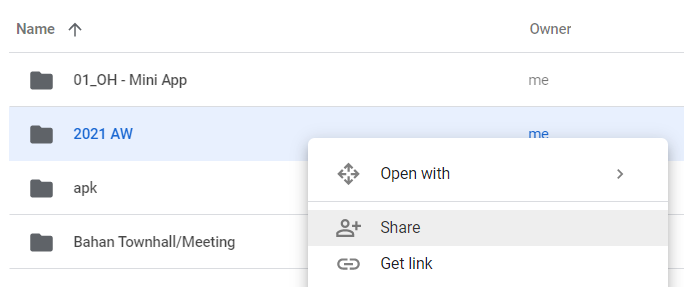
- Right-click on the individual folder and select Share.
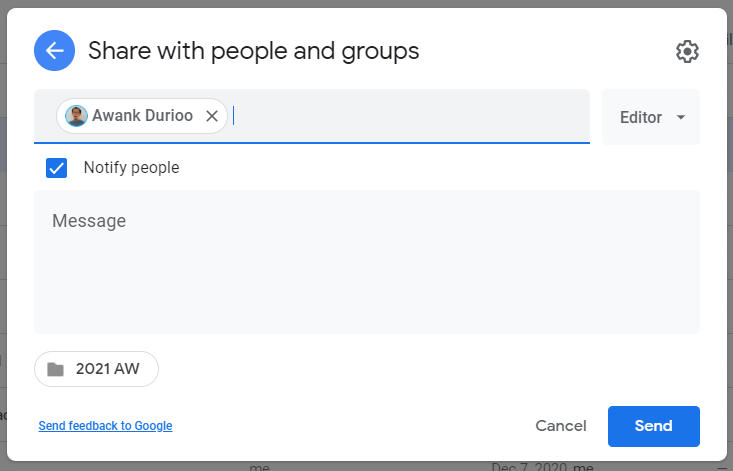
For the sample, I want to share my '2021 AW' folder from aditya.aw@digitaldurian.tv to my new email awank@durioo.com
- Insert your new Durioo's email address. Set as 'Editor' and click on 'Send'
🔭 xxxx
Our vision is to be earth's most customer-centric company; to build a place where people can come to find and discovery anything they want to buy online.
2. Create one folder as a master sharing folder
xxxx